

Any reason that this may be happening? I have the correct profile name in the right field under "Item Management" in Abrosia.

Neotracker not working for me?
Started by Bips712, Jun 21 2011 08:47 PM
13 replies to this topic
#1
Bips712
-

-

- 35 posts
Posted 21 June 2011 - 08:47 PM
Any reason that this may be happening? I have the correct profile name in the right field under "Item Management" in Abrosia.
#2
Neoquest
-

-

- 1760 posts
Posted 21 June 2011 - 08:56 PM
I know you said you had it correct but after yesterdays update make sure that it's still in there. If it is, the Tracker is fairly glitchy so it just might be a bug.
#3
Waser Lave
-

-

- 25516 posts
Posted 22 June 2011 - 12:31 AM
the Tracker is fairly glitchy so it just might be a bug.

#4
Bips712
-
-
- 35 posts
Posted 22 June 2011 - 12:26 PM
Still no luck. Definately is the same profile in the neotracker as in abrosia. Tried deleting my old profile and making a new one, didn't work. 
#5
Neoquest
-
-
- 1760 posts
Posted 22 June 2011 - 01:13 PM
Sorry Waser it's the truth. Mine hasn't been graphing at all ever since I started it.
#6
Waser Lave
-
-
- 25516 posts
Posted 22 June 2011 - 01:15 PM
Sorry Waser it's the truth. Mine hasn't been graphing at all ever since I started it.
Are you sure you're just not doing it wrong? Show me a screenshot.
#7
Neoquest
-
-
- 1760 posts
Posted 22 June 2011 - 01:21 PM
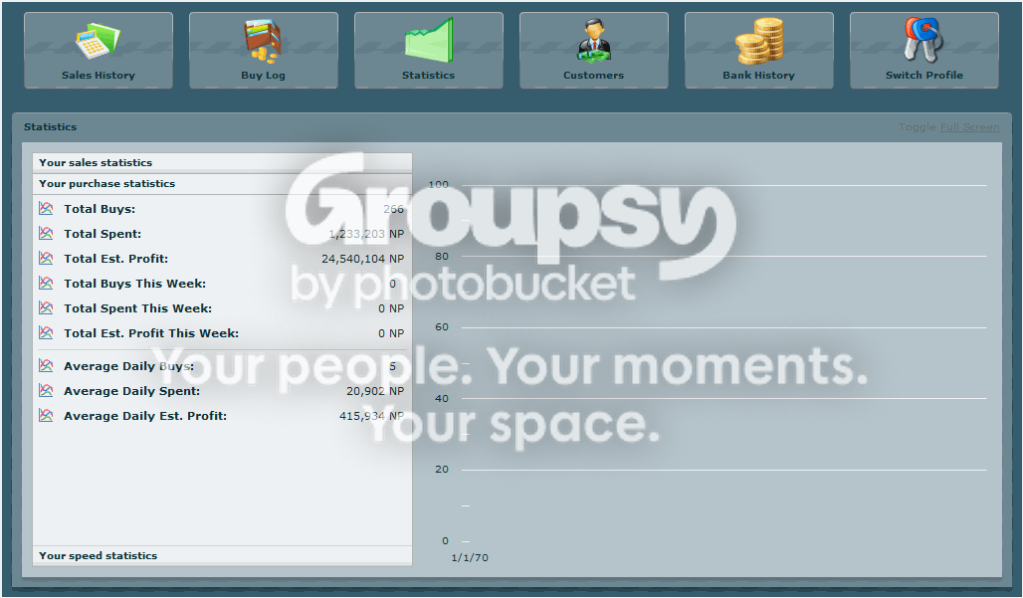
I'm not sure what I could be doing wrong
 (sorry for the low quality, I saved it in 8-bit)
Edited by Neoquest, 22 June 2011 - 01:22 PM.
#9
Neoquest
-
-
- 1760 posts
Posted 22 June 2011 - 01:28 PM
OMG I love you Waser, sorry for being such a stupid noob.
#10
Waser Lave
-
-
- 25516 posts
Posted 22 June 2011 - 01:29 PM
OMG I love you Waser, sorry for being such a stupid noob.
It should tell you to do that if you mouseover where the graph is displayed.

#11
Neoquest
-
-
- 1760 posts
Posted 22 June 2011 - 01:32 PM
It should tell you to do that if you mouseover where the graph is displayed.
As I said, I am sorry for being such a stupid noob.

#12
Plunk
-

-

- 545 posts
Official Neocodex Dollface
Posted 22 June 2011 - 03:52 PM
That was one of the funniest things I've ever seen.
As for your problem, I had the same thing happen. If you downloaded the new program manager, it removed the name of the profile from your Abrosia settings. Double check that it's there, and the checkbox is checked.
As for your problem, I had the same thing happen. If you downloaded the new program manager, it removed the name of the profile from your Abrosia settings. Double check that it's there, and the checkbox is checked.
#13
CJames
-

-
- 388 posts
Posted 23 June 2011 - 06:06 PM
That was one of the funniest things I've ever seen.
As for your problem, I had the same thing happen. If you downloaded the new program manager, it removed the name of the profile from your Abrosia settings. Double check that it's there, and the checkbox is checked.
And make sure to create the profile first in neotracker before you put the profile name in abrosia.. i encountered this problem when i cant create the profile name i had written in abrosia earlier....
#14
Sinwin
-

-
- 523 posts
Posted 01 July 2011 - 07:18 PM
I'm also having problem with neotracker. Not having anything recorded
1 user(s) are reading this topic
0 members, 1 guests, 0 anonymous users

