Quantcast

What works and what is paused · Email is limited to account activation and password resets.

Jump to content


Photo

How to Make an Abrosia List - Improved (Using Notepad++)


  • Please log in to reply
37 replies to this topic

#1 esotericaKoalan

esotericaKoalan
  • 143 posts

Posted 31 March 2012 - 03:39 PM

*
POPULAR POST!

In the previous guide, the list in Notepad++ was sorted alphabetically. I found that slightly annoying so I figured out a way to keep the list in order by profit.
(And I guess this will actually be useful, now that free advanced membership was removed.)

Copying the list into Notepad++ is the same. If you don't know how, read the previous guide until this picture:
Spoiler
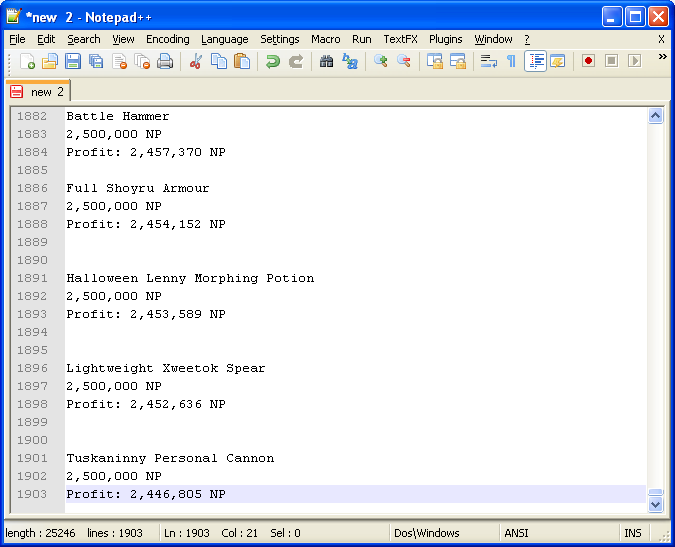


First, we'll remove all the lines containing the string " NP".
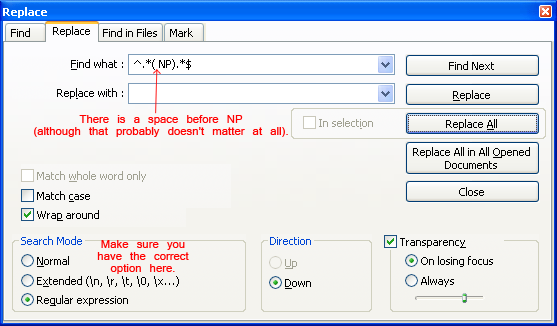
Press Ctrl+H to open the Find/Replace window.
Type ^.*( NP).*$ in the find box and nothing in the replace box.
Posted Image
Make sure you have the correct options selected!

Here's a crude explanation of what the symbols mean (skip if you're not interested):
Spoiler

After you're finished, click the "Replace All" button, and all the lines that had " NP" should be gone now!

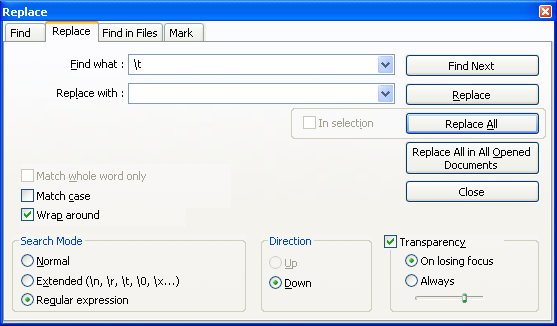
Now we will remove the blank lines. But first, we have to remove some of the tabs on a few lines. Press Ctrl+H again to open the Find/Replace window (or just don't close the Find/Replace window).
Type \t in the find box and nothing in the replace box.
Posted Image
Nothing visible should change, but all the tabs are gone now.

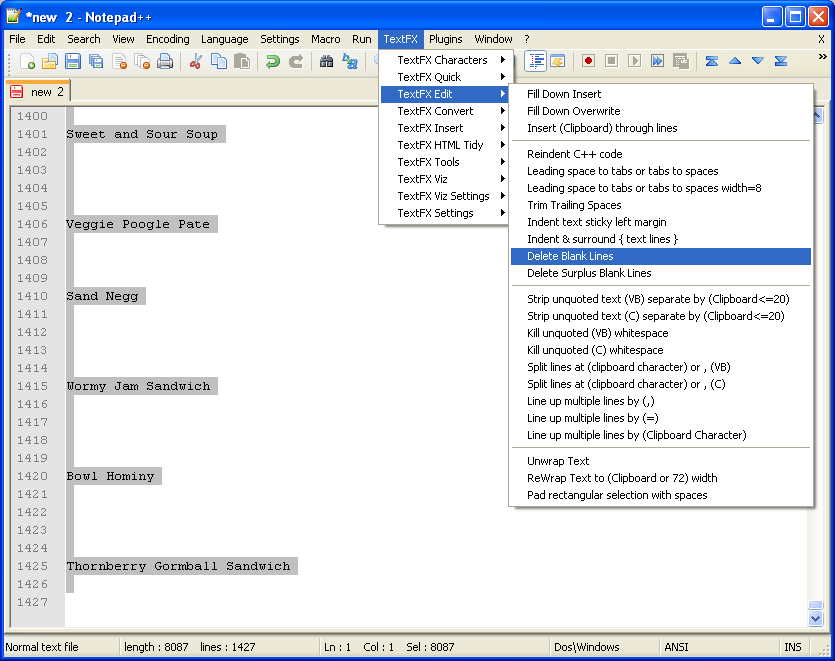
Finally, press Ctrl+A to select everything, go into TextFX, and delete all the blank lines.
Posted Image

There you go! Now you have your Abrosia list in descending profit.
(There might still be a blank line at the beginning and the end. Just delete those using backspace or something.)

Edit: I removed a bunch of redundancies...

Edited by Synecdoche, 31 March 2012 - 05:12 PM.


Advertisement

    #2 Icey Defeat

    Icey Defeat
    • 8298 posts


    Users Awards

    Posted 31 March 2012 - 03:45 PM

    Cool guide for those who don't have much experience with Notepad++!

    For further reading I would recommend people look into macros, which could essentially turn it into a copy and paste situation: http://stackoverflow...cro-for-notepad

    #3 JohnBrown

    JohnBrown
    • 31 posts

    Posted 31 March 2012 - 05:10 PM

    Wow, very nice. Turned an already easy process even easier. Very nice indeed. Thanks for the guide!

    #4 syaopup

    syaopup
    • 61 posts

    Posted 31 March 2012 - 05:33 PM

    *points at signature*
    Your tutorial should help those who aren't on windows though. :)

    #5 imcominatcha

    imcominatcha
    • 97 posts

    Posted 07 April 2012 - 07:11 AM

    Cool guide for those who don't have much experience with Notepad++!

    For further reading I would recommend people look into macros, which could essentially turn it into a copy and paste situation: http://stackoverflow...cro-for-notepad


    Yeah, I use macros in Word. Word lets you have colour, font etc variations, so you could, say, have different font sizes for different prices/profits.

    #6 LolAtMe

    LolAtMe
    • 6 posts

    Posted 09 April 2012 - 10:14 AM

    Great guide. Made my own list in minutes.
    Thanks for posting this!

    #7 Talix

    Talix
    • 30 posts

    Posted 09 April 2012 - 04:31 PM

    I am doing the 'Load a Manual Shop List' correct? What shop ID do I put in then if all the items are from different shops?

    Or does this only work for items for a certain shop because the NeoCodex has an option for using lists provided by the site.

    Edited by Talix, 09 April 2012 - 04:32 PM.


    #8 Rainie

    Rainie
    • 854 posts

    Posted 09 April 2012 - 04:35 PM

    I am doing the 'Load a Manual Shop List' correct? What shop ID do I put in then if all the items are from different shops?

    Or does this only work for items for a certain shop because the NeoCodex has an option for using lists provided by the site.


    Abrosia lists only work for specific shops

    #9 Spirited

    Spirited
    • 677 posts


    Users Awards

    Posted 09 April 2012 - 10:17 PM

    I am doing the 'Load a Manual Shop List' correct? What shop ID do I put in then if all the items are from different shops?

    Or does this only work for items for a certain shop because the NeoCodex has an option for using lists provided by the site.


    One list should only contain a set of items from that one shop you want to buy from. Then you would insert that shop ID.

    #10 esotericaKoalan

    esotericaKoalan
    • 143 posts

    Posted 11 April 2012 - 05:37 PM

    I am doing the 'Load a Manual Shop List' correct? What shop ID do I put in then if all the items are from different shops?

    Or does this only work for items for a certain shop because the NeoCodex has an option for using lists provided by the site.


    Using lists, you can only visit 1 shop. You specify this shop in the shop ID box right above the list place.

    You can combine items from different shops in your list, Abrosia will only buy the items in that list that are found in the shop you specify.
    But if you do that, it's slower because Abrosia has to search through items in the list that aren't even sold at that shop (which takes time), and you'll miss more items.

    #11 chipndale

    chipndale
    • 45 posts

    Posted 21 April 2012 - 12:16 AM

    Hi does anyone else have the same problem with the \t part ? I can't seem to remove the tabbed lines, so the items in my list are not continuous. Will this affect Abrosia's speed? :/

    #12 latituded1

    latituded1
    • 19 posts

    Posted 28 April 2012 - 12:42 PM

    after i do the \t, the list becomes like this
    ....


    Number Crackers and Cheese

    CPMPB Pizza

    Honey Glazed Ham

    Xweetok Vegetable Soup

    Sparkling Blue New Year Juice

    .....

    I did this a year ago and it was perfectly fine but idk why it doesn't work as well now :\

    #13 Inkheart

    Inkheart
    • 268 posts

    Posted 28 April 2012 - 01:37 PM

    Here you go!

    Copy and paste all the items together into one big list just like you normally would, except instead of using proprietary Windows software and weird-ass symbols to generate your list, just click "Generate List". : )

    The magical Regex, for the curious:

    /(.+?)\r?\n(?:[\d,]+ NP|U)/


    #14 esotericaKoalan

    esotericaKoalan
    • 143 posts

    Posted 28 April 2012 - 07:40 PM

    Wow, that's useful. +rep

    #15 latituded1

    latituded1
    • 19 posts

    Posted 28 April 2012 - 11:45 PM

    Wow extremely useful, +rep as well, :)

    Edit: Everything works fine! the only thing is that if the item starts with the letter U, it'll end up like this:

    Black Negg
    Purple Negg

    ltra Negg
    Green Negg
    Red Negg

    Edited by latituded1, 29 April 2012 - 12:07 AM.


    #16 esotericaKoalan

    esotericaKoalan
    • 143 posts

    Posted 29 April 2012 - 09:19 AM

    Maybe change /(.+?)\r?\n(?:[\d,]+ NP|U)/ to /(.+?)\r?\n(?:[\d,]+ NP|Unpriced)/?

    #17 Inkheart

    Inkheart
    • 268 posts

    Posted 29 April 2012 - 09:34 AM

    Maybe change /(.+?)\r?\n(?:[\d,]+ NP|U)/ to /(.+?)\r?\n(?:[\d,]+ NP|Unpriced)/?


    Heh, yeah, I fixed it. Tried to make the regex as short as possible. : )

    #18 anberside

    anberside
    • 2 posts

    Posted 11 May 2012 - 12:25 PM

    Thank you for this guide! I decided to actually start posting because I wanted to thank you. Nicely done, thank you.

    #19 Syntax

    Syntax
    • Not an error.

    • 991 posts


    Users Awards

    Posted 30 May 2012 - 09:30 AM

    I'm a bit confused. I got the same problem as latituded1, but I can't seem to access the app to fix it. Any help would be appreciated.

    #20 Burd

    Burd
    • 274 posts

    Posted 30 May 2012 - 09:59 AM

    I'm a bit confused. I got the same problem as latituded1, but I can't seem to access the app to fix it. Any help would be appreciated.

    I just tried it with a bunch of items starting with U and had no issues, so I'm not too sure why you're getting that problem :C
    But if you feel like PMing me your list or something, I can format it for you.

    #21 Syntax

    Syntax
    • Not an error.

    • 991 posts


    Users Awards

    Posted 01 June 2012 - 01:05 PM

    I PM'ed you. :)

    To be more specific about my problem, when I try to replace , it just comes back with 0 occurences replaced.

    #22 Burd

    Burd
    • 274 posts

    Posted 02 June 2012 - 04:04 AM

    I PM'ed you. :)

    To be more specific about my problem, when I try to replace , it just comes back with 0 occurences replaced.

    Replied C:

    I'll assume you're talking about the replacement, since in your list, all prices were gone but some indents remained.
    replacement didn't work when I tried either (I'm not a genius in this matter, so I have no idea why :c ! Maybe they didn't qualify as columns?), but experimenting with your list again, any of the three below removed them:
    TextFX > TextFX Edit > Reindent C++ code
    OR
    TextFX > TextFX Edit> Leading space to tabs or tabs to spaces
    OR
    TextFX > TextFX Edit> Leading space to tabs or tabs to spaces width=8

    Perhaps we should wait until an expert on this matter comes, but for now, your list should be fine XD

    edit. Can't say \ t
    lol

    Edited by Burd, 02 June 2012 - 04:05 AM.


    #23 Syntax

    Syntax
    • Not an error.

    • 991 posts


    Users Awards

    Posted 08 June 2012 - 01:10 AM

    Replied C:

    I'll assume you're talking about the replacement, since in your list, all prices were gone but some indents remained.
    replacement didn't work when I tried either (I'm not a genius in this matter, so I have no idea why :c ! Maybe they didn't qualify as columns?), but experimenting with your list again, any of the three below removed them:
    TextFX > TextFX Edit > Reindent C++ code
    OR
    TextFX > TextFX Edit> Leading space to tabs or tabs to spaces
    OR
    TextFX > TextFX Edit> Leading space to tabs or tabs to spaces width=8

    Perhaps we should wait until an expert on this matter comes, but for now, your list should be fine XD

    edit. Can't say \ t
    lol


    I got the problem again on a new list, but I used your method and it works now. I really have no clue why I have the indenting problem, but it works for me. Thanks bunches. :D

    #24 mintpro

    mintpro
    • 597 posts


    Users Awards

    Posted 17 June 2012 - 01:34 PM

    Thanks for the guide, it's really helpful! Just made my first list for Abrosia, hopefully everything start to roll smoothly.

    #25 Alodielle

    Alodielle
    • 144 posts

    Posted 27 June 2012 - 04:26 PM

    Regexes are sexy as hell.

    Terrific guide!


    0 user(s) are reading this topic

    0 members, 0 guests, 0 anonymous users