


Help <_<
Started by jc301290, Jun 14 2007 12:09 PM
11 replies to this topic


#2
Freddy
-

-

- 5500 posts
Posted 14 June 2007 - 12:28 PM
http://www.tigerdire...lc.asp?CatId=99
Thats where you want to go just to look for them you dont have to buy anything from there, but you can find what you would like. I personally just inserted like 4 fans that are pretty quiet and don't take too much space or power or anything like that.
Thats where you want to go just to look for them you dont have to buy anything from there, but you can find what you would like. I personally just inserted like 4 fans that are pretty quiet and don't take too much space or power or anything like that.
#4
Hawk
-

-
- 9690 posts
hawk·ish·ly
Posted 14 June 2007 - 01:39 PM
If your feet are warm sitting BY the computer that is good. It means its kicking out heat. Since temperatures outside are warming up, is it possible that the fans have their own temperature sensor which changes the speed they run at?
It would help to have some background... What type of case is it?
What processor is it? Is it overclocked?
What vid card do you have running?
How many hard drives do you have?
You said you have case fans- What size are they? How many will your case support/Will you be willing to mod a case?
Edit: Also need the socket your CPU is using, that affects what cooling systems will work with your system.
It would help to have some background... What type of case is it?
What processor is it? Is it overclocked?
What vid card do you have running?
How many hard drives do you have?
You said you have case fans- What size are they? How many will your case support/Will you be willing to mod a case?
Edit: Also need the socket your CPU is using, that affects what cooling systems will work with your system.
Edited by Hawk, 14 June 2007 - 01:41 PM.
#5
Hawk
-
-
- 9690 posts
hawk·ish·ly
Posted 14 June 2007 - 02:11 PM
Alright, with that case you can have:
2 x 120mm fans. One in the front, one in the back
1 x 80 mm fan, that would be on the side panel
If you're looking into new fans, get ones that have a knob that you can control. Also, if its replacing the fans that came with the case, you should notice a huge improvement over them.
http://www.newegg.co...p;name=Variable <- 120mm variable speed
http://www.newegg.co...p;name=Variable <- 80mm variable speed
The ambient temperature may have something to do with the increased noise. Also, are you sure its not the hard drive making noise?
You really don't need water cooling unless you are overclocking your rig. Even then, water cooling isn't always the best option.
Edit: After re-reading your first post... Are your feet by the front of your computer?
2 x 120mm fans. One in the front, one in the back
1 x 80 mm fan, that would be on the side panel
If you're looking into new fans, get ones that have a knob that you can control. Also, if its replacing the fans that came with the case, you should notice a huge improvement over them.
http://www.newegg.co...p;name=Variable <- 120mm variable speed
http://www.newegg.co...p;name=Variable <- 80mm variable speed
The ambient temperature may have something to do with the increased noise. Also, are you sure its not the hard drive making noise?
You really don't need water cooling unless you are overclocking your rig. Even then, water cooling isn't always the best option.
Edit: After re-reading your first post... Are your feet by the front of your computer?
Edited by Hawk, 14 June 2007 - 02:15 PM.
#6
Hawk
-
-
- 9690 posts
hawk·ish·ly
Posted 14 June 2007 - 02:44 PM
QUOTE(Josh @ Jun 14 2007, 05:42 PM) 
Well part of the noise is that something vibrates the case. I have it elevated on it's side a little bit right now and the vibrations stop. When it's flat on the ground it makes a very loud vibration noise and I have no idea what's doing it. I can hear the fan loud and clear, it sounds like the back one that makes the most noise. It's not too bad right now because I have it elevated but if it moves slightly it starts making that vibration noise again.
I have no idea on what to do o.o
#7
Bão
-

-
- 5407 posts
Posted 14 June 2007 - 05:02 PM
Take a flick of your computer with the side case off then show us where the vibration is coming from. Is the fan's part broken by any chance? I found that my fan was making noise when one of the blades had somehow broke off. Get a dust remover that contains compressed gas and clean out any dust.
#8
sockopen
-

-

- 1481 posts
Posted 14 June 2007 - 06:24 PM
QUOTE(Josh @ Jun 14 2007, 04:33 PM)
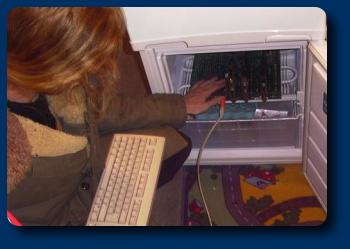
o_0 What's a mini fridge have to do with computers? 
Everything! I thought you asked for a way to keep your computer cool... stuff it in a mini fridge or freezer.



#9
Le Chango
-

-

- 1026 posts
Posted 14 June 2007 - 07:06 PM
QUOTE(sockopen @ Jun 14 2007, 06:24 PM)
Everything! I thought you asked for a way to keep your computer cool... stuff it in a mini fridge or freezer.
Wow... thats brilliant.
#10
Bão
-
-
- 5407 posts
Posted 15 June 2007 - 03:31 AM
QUOTE(sockopen @ Jun 14 2007, 05:18 PM)
Two words -> Mini fridge.
I didn't believe that a mini fridge would work at first and I still don't. I thought about my brother's mini fridge; it sucks! It keeps the drinks inside a little cooler than room temperature. I looked up on this topic and a fridge just doesn't have the capability to continuously cool down the motherboard.
Source
Source
#11
sockopen
-
-
- 1481 posts
Posted 15 June 2007 - 07:09 AM
QUOTE(Bão @ Jun 15 2007, 07:31 AM)
I didn't believe that a mini fridge would work at first and I still don't. I thought about my brother's mini fridge; it sucks! It keeps the drinks inside a little cooler than room temperature. I looked up on this topic and a fridge just doesn't have the capability to continuously cool down the motherboard.
Source
Source
Source
Source
Then you're just going to have to "overclock" your mini fridge. =X
#12
Christopher Robin
-

-
- 5302 posts
Posted 15 June 2007 - 09:05 AM
My fan speeds up a lot... but there's a LOT of dust in front of the screen-style thing in front of my cpu... I think it's the CPU
Anyways... I need to get my compressor up here and spray it My mom won't buy compressed air cause she thinks I'll huff it or some shit
Anyways... I need to get my compressor up here and spray it
My mom won't buy compressed air cause she thinks I'll huff it or some shit
1 user(s) are reading this topic
0 members, 1 guests, 0 anonymous users

