

Quantcast

What works and what is paused ยท Email is limited to account activation and password resets.

Jump to content


Photo

Photoshop question


  • Please log in to reply
2 replies to this topic

#1 Britta

Britta
  • 27 posts

Posted 27 September 2007 - 05:57 PM

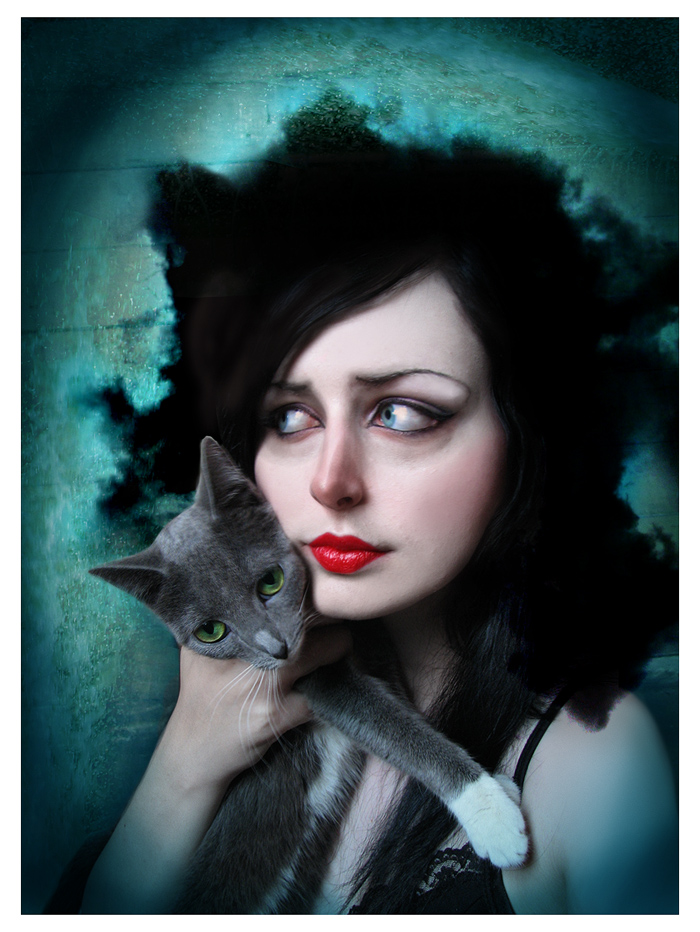
I've forgotten how to get this effect! I've been playing around for about an hour but I can't remember...


It's how to take a real picture and make it look like it's painted. Can anyone help me figure it out? She also added a texturized background but I know how to do that. I just need to know how to blend the skin and etc... Thanks in advance!

edit: if you want to see more of her work look up asunder on deviantart

Edited by Britta, 27 September 2007 - 05:59 PM.


Advertisement

    #2 Charmender

    Charmender
    • Awesome

    • 4104 posts


    Users Awards

    Posted 27 September 2007 - 06:11 PM

    Looks to me like its been done with the liquify tool for the eyes, and then a couple of filters, look on google for painted photoshop effects?

    #3 Britta

    Britta
    • 27 posts

    Posted 27 September 2007 - 06:22 PM

    Yeah i thought it was liquify for the eyes..but I don't know exactly what filters and in which combination...I'll keep looking.

    Oh and I love your avatar Calu nana.gif


    1 user(s) are reading this topic

    0 members, 1 guests, 0 anonymous users
