
Jump to content


CMD Manager


  • Please log in to reply
63 replies to this topic

#1 Neoquest

Neoquest
  • Trader Score:21

Posted 07 January 2012 - 04:17 PM

*
POPULAR POST!

I've finally cleaned up the Python version of the avatar grabbing .bat file I released awhile ago. This version comes with a few other small Neopets Python scripts I've written, and it no longer opens a ton of tabs. The program is called CMD manager because it doesn't have a GUI, so it has an interface similar to the .bat file.

Navigation through the program is accomplished with entering numbers and strings. When it asks you for a file name to read/save to, a text file must be provided, any text file you want to use needs to be stored in the same folder as the .exe. It has no error handling, so if you mess something up, chances are it will just quit without saying anything. It will require a login, but if you'd like to make sure the functionality of the program is genuine, you can use a few of the programs without being logged in. I've also compiled the .py file into .exe for ease of use. (Thanks to py2exe) Lastly, I'd like to say that I hope any admins/mods are fine with me posting this here, I don't see why it wouldn't be, and that's why I'm posting without asking permission first.


Screenshot of program started up and logged in:
Spoiler
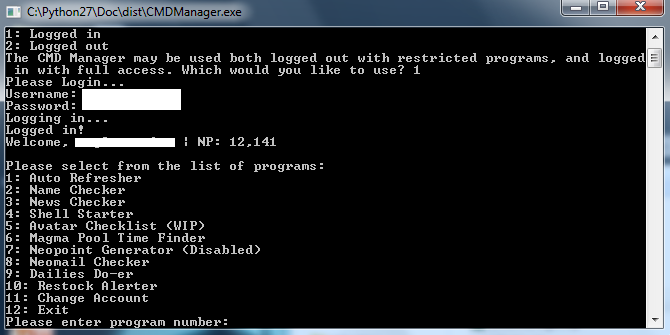
List of programs:
(Logged in)

1: Auto Refresher - Allows you to refresh on a specific page, or randomly visit pages. Reports when a random event occurs (although not what kind), includes editable refresh rate, amount of refreshes, and amount of REs that the program will allow before stopping.
2: Name Checker - Full of name checking features. Allows you to import a list of names from a text file, manually type names, and supports both usernames and pet names. (The UN checking part of the program is a work in progress)
3: News Checker (Untested) - Made to check the news. I've made some improvements and decided to enable it, although it is untested. Issues a beep and informs you when the news updates.
4: Shell Starter - Includes Clickable avatar grabber and BD challenger grabber.
5: Avatar Checklist (WIP) - Almost done, adds a few avatars to your output whether you have them or not.
6: Magma Pool Time Finder - Works as of version 1.1. Writes times that the guard was awake to text file so you know what hours have already been checked. Writes actual magma pool time to the text file, and issues a beep when it has found the time.
7: Neopoint Generator (Disabled) - The program will tell you that the neopoint generator is disabled, but you can still use it. It just won't make any Neopoints because the sponsor links are down.
8: Neomail Checker - A simple program that checks if you have any new neomails, alerts you if you do, and tells you who the neomail is from. A beep will play when a neomail is received.
9: Dailies Do-er - Does dailies. For most dailies you will receive a short message on what you got.
10: Restock Alerter - I made this mainly for myself, but decided to include it for anyone who likes the excitement of legit/semi-legit RSing more. Allows you to choose a shop ID to refresh at, and if you want "shop emptying statistics" (this is pretty much just a number that shows items leaving and entering the shop and gives you reassurance that it's still working on a slow restock day.) Also will beep when the shop restocks and will open a new tab in your default browser with the shop in it. Beeps twice and stops when RS banned. Default refresh rate is 6-8 seconds. Will make this configurable when I think of a smooth way to implement settings.

Change log:
Spoiler

Enjoy, and please tell me if something is not working properly.

Download - v1.3.2

Edited by Neoquest, 20 April 2012 - 10:15 PM.

Posted Image
Sig by Rooshy
Stuff I've done:

Advertisement

    #2 onlyme

    onlyme
    • Trader Score:24

    Posted 07 January 2012 - 05:15 PM

    oh sweet!

    Posted Image


    Spoiler


    #3 Robin

    Robin
    • Trader Score:15

    Posted 07 January 2012 - 05:16 PM

    Nice! The Shell-Starter sounds good... +rep

    Posted Image

    Spoiler


    #4 Strategist

    Strategist
    • Trader Score:112

    Posted 07 January 2012 - 05:24 PM

    cheers for the updated version mate. Top efforts so far. Im looking forward to some of the other features being enabled in the future. +rep

    Posted Image

    Resident Aussie Moderator

    Official Neocodex Middleman


    #5 soul__stealer

    soul__stealer
    • Trader Score:28

    Posted 07 January 2012 - 05:46 PM

    Screenshot fails to load, but list of features sounds good. Well done! :)

    Posted Image

    Quote

    dorino: you look bad ass from the neck down and above that you're a god damn nerd, soul


    #6 Neoquest

    Neoquest
    • Trader Score:21

    Posted 07 January 2012 - 06:01 PM

    Thanks guys! Most of the planned features shouldn't take too long to add in, and the disabled programs are mostly disabled because I haven't gotten around to actually testing if they work. Screenshot fixed.
    Posted Image
    Sig by Rooshy
    Stuff I've done:

    #7 Strategist

    Strategist
    • Trader Score:112

    Posted 07 January 2012 - 06:06 PM

    if ya want a hand to test them out let me know mate.

    Posted Image

    Resident Aussie Moderator

    Official Neocodex Middleman


    #8 Neoquest

    Neoquest
    • Trader Score:21

    Posted 07 January 2012 - 06:15 PM

    It's good, it's not that it's difficult or time consuming to test, I always just forget.

    Edited by Neoquest, 07 January 2012 - 06:33 PM.

    Posted Image
    Sig by Rooshy
    Stuff I've done:

    #9 Applepi

    Applepi
    • Trader Score:4.94

    Posted 07 January 2012 - 06:36 PM

    This is really cool!!! I'll be stalking this thread for updates :) Thanks!
    Posted Image

    Credit: California :)

    #10 xangxang

    xangxang
    • Trader Score:1

    Posted 07 January 2012 - 08:43 PM

    i hope that there will be some programmes help me to buy items for kitchen quest

    Edited by xangxang, 07 January 2012 - 08:43 PM.


    #11 Bone

    Bone
    • Trader Score:12

    Posted 07 January 2012 - 08:49 PM

    View Postxangxang, on 07 January 2012 - 08:43 PM, said:

    i hope that there will be some programmes help me to buy items for kitchen quest

    http://www.neocodex....s-and-holidays/

    #12 Turnip

    Turnip
    • Trader Score:2

    Posted 08 January 2012 - 01:58 AM

    This sounds great, I'll have to try it out sometime! :D Thank you!! ♥

    Posted Image

    ~*~* Click here for my buying thread!! :3 *~*~


    #13 Russell

    Russell
    • Trader Score:13.56

    Posted 08 January 2012 - 02:22 AM

    As soon as I get the computer fixed, I'm going to use this. :D Love you!

    Spoiler

    Posted Image

    My Buying (Shells) Thread.

    My Selling (Advanced) Thread.

    Neocodex for Noobs - A Simple Pictoral Explanation


    #14 Zangetsu

    Zangetsu

    Posted 08 January 2012 - 02:42 AM

    View PostApplepi, on 07 January 2012 - 06:36 PM, said:

    This is really cool!!! I'll be stalking this thread for updates :) Thanks!


    #15 Jaws

    Jaws
    • Trader Score:7

    Posted 08 January 2012 - 03:41 AM

    Aww, windows only!
    Shame, the Auto Refresher sounds great, have been looking for the snowbeast for ages >.>

    Edited by Jaws, 08 January 2012 - 03:42 AM.

    Posted Image


    #16 Neoquest

    Neoquest
    • Trader Score:21

    Posted 08 January 2012 - 09:05 AM

    View PostJaws, on 08 January 2012 - 03:41 AM, said:

    Aww, windows only!
    Shame, the Auto Refresher sounds great, have been looking for the snowbeast for ages >.>

    I could release the just .py file, and it would work for Mac, but it would be a little more involved than just double clicking a .exe.
    Posted Image
    Sig by Rooshy
    Stuff I've done:

    #17 Applepi

    Applepi
    • Trader Score:4.94

    Posted 08 January 2012 - 10:07 AM

    I've tried it out (to do the dailies) and it works really well!

    I'm so excited about the magma pool time finder! Also I dont really know what Post/get data is for the daily doer... does that exclude dailies like discarded plushie and apple bobbing? I'm still trying those for avatars and it would have been awesome if they were included in the daily doer
    Posted Image

    Credit: California :)

    #18 James

    James
    • Trader Score:1

    Posted 08 January 2012 - 10:40 AM

    Wow, great job! Can't wait to test it out! I have used your original version and I already love it. xD

    I usually don't do dailies since they take me forever some how. >.> But this program helps a lot. :)
    Posted Image

    #19 Jaws

    Jaws
    • Trader Score:7

    Posted 08 January 2012 - 10:43 AM

    View PostNeoquest, on 08 January 2012 - 09:05 AM, said:

    I could release the just .py file, and it would work for Mac, but it would be a little more involved than just double clicking a .exe.

    I'm sorry I don't know much about programming, but unless it's not too complicated us mac users could figure out how to set it up :)
    As long as it doesn't require more than 30 steps xD

    Posted Image


    #20 Neoquest

    Neoquest
    • Trader Score:21

    Posted 08 January 2012 - 04:56 PM

    View PostApplepi, on 08 January 2012 - 10:07 AM, said:

    I've tried it out (to do the dailies) and it works really well!

    I'm so excited about the magma pool time finder! Also I dont really know what Post/get data is for the daily doer... does that exclude dailies like discarded plushie and apple bobbing? I'm still trying those for avatars and it would have been awesome if they were included in the daily doer

    Thanks! The dailies do-er includes apple bobbing, but not the discarded plushie. I'll see if I can add that one. The magma pool time finder is done, I just need to see if it works by running it for 24 hours.


    View PostCold, on 08 January 2012 - 10:40 AM, said:

    Wow, great job! Can't wait to test it out! I have used your original version and I already love it. xD

    Thanks!

    I usually don't do dailies since they take me forever some how. >.> But this program helps a lot. :)


    View PostJaws, on 08 January 2012 - 10:43 AM, said:

    I'm sorry I don't know much about programming, but unless it's not too complicated us mac users could figure out how to set it up :)
    As long as it doesn't require more than 30 steps xD

    It shouldn't be too bad, I know Macs come with Python pre-installed, but I'm under the impression that the distributed versions are out of date. I'll PM you the .py and some instructions to see if you can get it working.
    Posted Image
    Sig by Rooshy
    Stuff I've done:

    #21 Neoquest

    Neoquest
    • Trader Score:21

    Posted 09 January 2012 - 07:22 PM

    Released version 1.1.
    Posted Image
    Sig by Rooshy
    Stuff I've done:

    #22 Applepi

    Applepi
    • Trader Score:4.94

    Posted 09 January 2012 - 07:38 PM

    View PostNeoquest, on 08 January 2012 - 04:56 PM, said:

    Thanks! The dailies do-er includes apple bobbing, but not the discarded plushie. I'll see if I can add that one. The magma pool time finder is done, I just need to see if it works by running it for 24 hours.


    Yeah I noticed apple bobbing today (whoops!) I can try out the magma finder for you if you'd like more data... is it just going to refresh every 5 mins until the guard is sleeping?
    Posted Image

    Credit: California :)

    #23 Neoquest

    Neoquest
    • Trader Score:21

    Posted 09 January 2012 - 07:47 PM

    View PostApplepi, on 09 January 2012 - 07:38 PM, said:

    Yeah I noticed apple bobbing today (whoops!) I can try out the magma finder for you if you'd like more data... is it just going to refresh every 5 mins until the guard is sleeping?

    A random range between 6 minutes and 7 minutes. I already know the Magma Pool time finder works, as I tested it myself, but thanks for offering.
    Posted Image
    Sig by Rooshy
    Stuff I've done:

    #24 Applepi

    Applepi
    • Trader Score:4.94

    Posted 09 January 2012 - 07:53 PM

    View PostNeoquest, on 09 January 2012 - 07:47 PM, said:

    A random range between 6 minutes and 7 minutes. I already know the Magma Pool time finder works, as I tested it myself, but thanks for offering.

    Okie dokie, I just turned it on, love the idea of the document, makes it much simpler than the GM script!
    Posted Image

    Credit: California :)

    #25 Strategist

    Strategist
    • Trader Score:112

    Posted 09 January 2012 - 08:27 PM

    Sweet. Loving the fact that the magma pool time finder records the times for you too. Great idea! Thanks once again

    Posted Image

    Resident Aussie Moderator

    Official Neocodex Middleman


    0 user(s) are reading this topic

    0 members, 0 guests, 0 anonymous users