Quantcast

What works and what is paused · Email is limited to account activation and password resets.

Jump to content


Photo

EASIEST Way to create AB lists.


  • Please log in to reply
13 replies to this topic

#1 Wrackspurt

Wrackspurt
  • 8 posts

Posted 15 May 2011 - 12:09 AM

I'm a non-advanced member and I use ABrosia.
But I really just wanna AB at the Bookshop, Pharmacy, Toyshop etc.

[With the help of : http://www.neocodex....list-creation/]

So what you wanna do first is find an item database (preferably one that can sort items by shop and profit and stuff. Sort it to the highest number of items per page possible. (I use neocodex's db)

1. Copy all the items/profit/price and paste it onto notepad++

2. Ctr + H to find/replace :
- 'Profit: ' with nothing

- '[0-9](.*)\sNP' with nothing

(The db I use gives a tab-like thingy so..)
- ' ' with nothing

Then use : http://textmechanic....mpty-Lines.html to remove all the empty lines.

Hope this helps everyone.

Advertisement

    #2 batryn

    batryn
    • 220 posts

    Posted 16 May 2011 - 01:31 PM

    To replace empty lines, sometimes I put the whole thing into word, replace "^p" with nothing, that will remove all the lines, but crowd all your words into a chunk. Then, I replace X number of spaces with ^p (Where X is a whole number greater than 1). Basically, because when you remove all the lines, you've compressed everything together, but what was separate lines before will have extra spaces in between... kinda hard to explain.

    #3 italianmafia

    italianmafia
    • 27 posts

    Posted 03 June 2011 - 12:34 PM

    this is even better:

    1. Copy all the items/profit/price and paste it onto notepad++

    2. Ctr + H to find/replace :
    - Profit: with nothing

    - [0-9](.*)\sNP with nothing

    save that list and go to http://textmechanic....cate-Lines.html if u you use this one, it removes every tab or enter of spaces, it works much better than the other option of that site

    load your text file

    if this is ready, press ' s ' to select all and afterwards copy everything in you're text file and save it

    now you're ready

    #4 batryn

    batryn
    • 220 posts

    Posted 03 June 2011 - 04:49 PM

    Thanks! +rep

    #5 umk

    umk
    • 15 posts

    Posted 07 June 2011 - 06:41 PM

    Thanks! This is a nice little guide for non-advance members. :)

    or you can do what I did, create a small program to automate the process for you. :p

    #6 koobe

    koobe
    • 591 posts

    Posted 07 June 2011 - 10:46 PM

    Thank you +rep

    #7 bananaswag

    bananaswag
    • 15 posts

    Posted 15 June 2011 - 12:03 PM

    Damn this actually helped me lol Cause abrosia just bought a Jeran stamp for me which is like negative points so I need to update my list haha think I'll do that now

    #8 remarkwoble

    remarkwoble
    • 1 posts

    Posted 18 June 2011 - 11:36 PM

    thanks :) i was having troubles

    #9 hellodar

    hellodar
    • 78 posts

    Posted 22 June 2011 - 10:50 PM

    this is even better:

    1. Copy all the items/profit/price and paste it onto notepad++

    2. Ctr + H to find/replace :
    - Profit: with nothing

    - [0-9](.*)\sNP with nothing

    save that list and go to http://textmechanic....cate-Lines.html if u you use this one, it removes every tab or enter of spaces, it works much better than the other option of that site

    load your text file

    if this is ready, press ' s ' to select all and afterwards copy everything in you're text file and save it

    now you're ready


    Thanks! now i dont need to go to seperate sites to remove tab and empty lines.

    #10 maxamillion

    maxamillion
    • 115 posts

    Posted 23 June 2011 - 04:42 AM

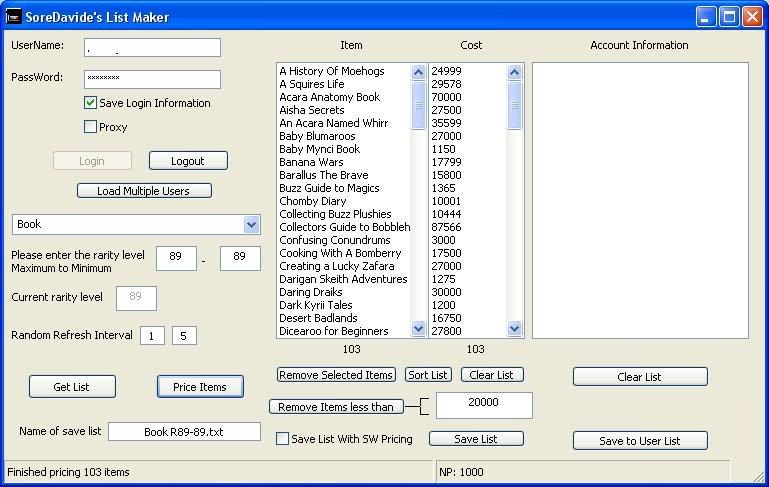
    Would anyone use a listmaker?
    Posted Image

    #11 ElPinapple

    ElPinapple
    • 204 posts

    Posted 23 June 2011 - 10:32 AM

    This didn't work for me. Maybe I am just stupid.

    #12 italianmafia

    italianmafia
    • 27 posts

    Posted 24 June 2011 - 10:09 AM

    normally if you follow each step, it would be easy to have good results.. make sure you have the notepad++ (it's not standard within windows!!) you must search it on google and download it for free

    #13 ccs990

    ccs990
    • 1 posts

    Posted 12 December 2012 - 12:12 AM

    How do you add more than one shop list to the program?

    #14 Merlarva

    Merlarva
    • 35 posts

    Posted 23 December 2012 - 05:44 PM

    I've been looking for a guide about this!! thanks!


    1 user(s) are reading this topic

    0 members, 1 guests, 0 anonymous users