Quantcast

What works and what is paused ยท Email is limited to account activation and password resets.

Jump to content


Eliam

Member Since 07 Feb 2008
Offline Feb 06 2024 10:06 AM

#1523268 SOTW #19 VOTING!

Posted by Eliam on 29 October 2011 - 05:41 PM

Not voting. :rolleyes:
People really could have been more creative with this theme.
Especially considering it's Halloween.


I don't think you can criticize people's creativity if you didn't enter. Just my personal opinion, though.


#1514428 SOTW #17.

Posted by Eliam on 30 September 2011 - 01:42 PM

I think people need to remember that it's just a friendly competition. I hope that this doesn't get overflown with flaming during results...Sure, the prizes may be great, but that doesn't give people the excuse to become ruthless and cruel to others, ya know?


Bitch, I know you didn't just come in here and try to turn this into no Lifetime movie.


#1514419 SOTW #17.

Posted by Eliam on 30 September 2011 - 01:25 PM

You know, I still think that gren skorcheio should have won...=P


#1420635 Is neopets dying? Or do you think its gaining in popularity?

Posted by Eliam on 05 March 2011 - 11:50 AM

Let's not forget that TNT treat the players like crap. Sometimes I have the feeling they think they're the Holy Inkvisition....
All the events and ads cannot help them keep their site active if they keep acting this way. With the "support" they have tis not a surprise ppl are quitting.


This


#1418334 Daily Dare 2011

Posted by Eliam on 01 March 2011 - 12:22 AM

Prizes for Day 1 (Top Chop):


AAA
Posted Image
Shekuu Training School Background


AAA Bonus
Posted Image
Pile of Wooden Planks


Abigail:
Posted Image
Best Woods For Chopping


Lulu NC Challenge:
Posted Image
Top Chop Coin Shower


Lulu Retro Challenge (Meerca Chase:
Posted Image
Sparkling Negg Wig


#1255446 DAILY DARE

Posted by Eliam on 11 February 2010 - 01:42 PM

Lule Score: 140
Lulu Item: Sparkling Negg Wig


#1246823 I have a question

Posted by Eliam on 11 January 2010 - 06:51 AM

You can just right click on the item that you don't want to display, and click "AdBlock"


#1212003 Restock Lists Guide

Posted by Eliam on 08 September 2009 - 08:21 PM

question on the "Active Users" is that stuff automatically tracked by Abrosia and price to show the profits


Honestly, I don't know how the active users works, or really understand the finer points of the Item Database.

I know that whenever Abrosia or Neon Autopricer prices an item that data gets added to the database. It's all automated, no human interaction whatsoever.

However, I've bee using the Autopricer for awhile but don't show up as pricing more than 25 items, which is odd O_o


#1211967 Restock Lists Guide

Posted by Eliam on 08 September 2009 - 06:52 PM

Ok, so you've downloaded Abrosia (or some other, less awesome ABer), and you want to start restocking. Well, luckily for you, Abrosia is ready right out of the box, just login and click start!

But maybe...just maybe you want a little more control. Perhaps you have a specific shop, like Toys or Grooming, or maybe you just want to target a certain shop. For that you will want to make a restock list. How do you make a restock list? Well, it's pretty simple!

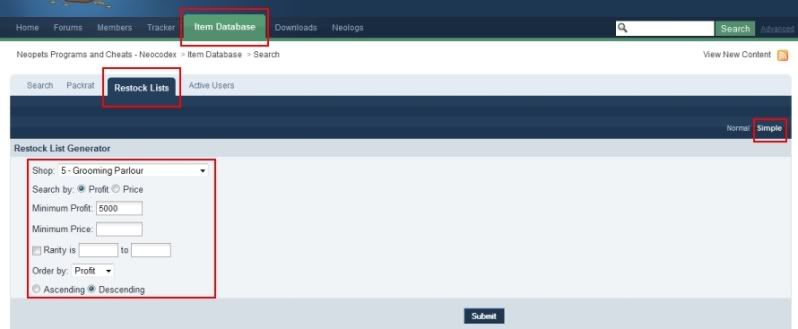
First, head over to Neocodex's Item Database, and select the Restock Lists tab. Over on the right, select "Simple" mode. Now select a shop, such as the Grooming Parlor, and set to search by Profit. I set my profit margin at 5000 NP to lessen the chance of restocking something that loses me money, but use your own common sense.

Posted Image


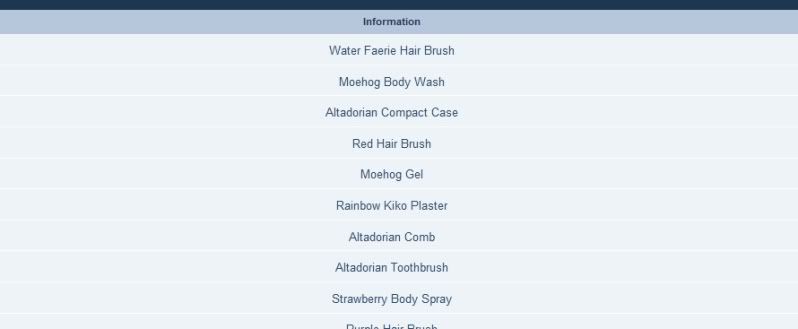
Now, his search and you'll get a list of items that restock in Grooming that sell for at least 5000 NP than their restock price.

Posted Image

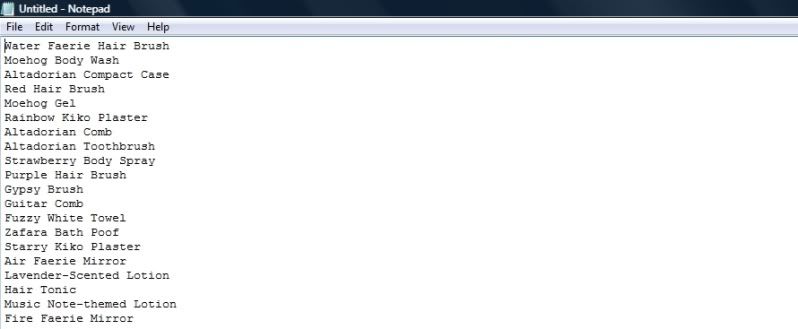
Select all the items with your mouse and copy them into a text file. I use Notepad, but you can use any word processig software, just be sure to save the list as a .txt file.

Posted Image

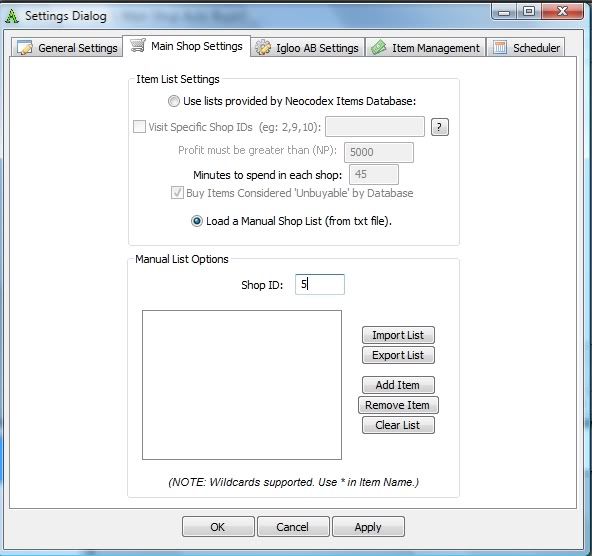
Then go into Abrosia and go to Settings > Program Settings > Main Shop Settings. Click "Load a Manual Shop List". Now, for "Shop ID", look at the link for the neopets shop you want to RS from. At the end is a number, that is the ID number. For grooming it is 5, so that's what I put. Next, hit "Import List" and select your text file. Your list should show up in the box on the left. Hit OK, and then start Abrosia! That's it!

Posted Image