


 Find content
 Male
Male


huevoquilmes
Member Since 09 Feb 2010Offline Sep 06 2013 03:41 PM
#1469675 In-Depth Semi Legit Restocking
 Posted by
on 13 June 2011 - 06:27 AM
Posted by
on 13 June 2011 - 06:27 AM
#1459390 Advanced member status
Posted by
on 22 May 2011 - 06:50 AM
another good idea, but requires some old members of the forum to help out, its have requirements, and once you get them (like 300posts, 30 rep and 2 helfull posts), you can apply.. and they see what you did, and tell you you are in, or to work a bit harder on something specific... I think something like this would make a more helpfull, and less spammy community
#1459386 Advanced member status
Posted by
on 22 May 2011 - 06:44 AM
well, it was just an idea.. and the helpfull posts also... I personally think its better than someone getting to 500posts with posts like "Do you like dogs?" and "What do you think of pamela anderson's right boob" 
#1459376 Advanced member status
Posted by
on 22 May 2011 - 06:29 AM
I was thinking today about the amount of spam posts and repleis that there are in the forum, due to the goal to reach 500post. I think that there should be a more balanced way to determine the "advanced status", because this system generates spam, and anyone, no matter what, can get to 500post.
I was thinking, since there isnt a use for the rep, maybe this can change, and need for advanced status, like 300posts, and 30rep, and maybe a good post that helps the comunnity. I dont know, just my two cents
*Sorry if i have many spelling mistakes
I was thinking, since there isnt a use for the rep, maybe this can change, and need for advanced status, like 300posts, and 30rep, and maybe a good post that helps the comunnity. I dont know, just my two cents
*Sorry if i have many spelling mistakes
#1458121 Guide To Neocodex Guides
Posted by
on 20 May 2011 - 12:33 PM
I decided to do this since a lot of people ask/have doubts about some things that there are a lot of threads about.
So instead of the search function, you can have them organized all in one spot 
Autobuying Guides
The 3 step in=depth guide on how not to get caught Autobuying
EASIEST Way to create AB lists
Autobuying Shops
Autobuyer List Creation
Restocking Guides
In-Depth Semi Legit Restocking
Best Single-store Restocking Locations
Store Restock Over Profit Counter
Battledome Guides
All Battledome Challengers
Beat Giant Ghostkerchief Every Time
Easy way of beating the brain tree
Beginners Guide to Neopets Training
Stock Market Guides
Redlions Stockmarket Tutorial
Stock Market
Proxy Guides
Richa's Foxy Proxy Guide - How to minimize the risk of getting chain Iced
Proxys and How to use them!
ScoreSending/ Game Cheating Guides
Obtaining, Preparing For, and Using mOBSCENE's / sLAUGHTER's Score Sender
AoB Master List
Nc Guide
Neocash and Trading Neocash Items
Other
My guide to silenced accounts
Installing Neocodex Programs on Linux
Making your account look a little more legit
Multi Account - Anonymity beyond proxy -hide info a proxy does not
Getting Programs to work on you Mac
If you have a guide to add, or some link isn't working, please post/pm me and I will fix it asap.
#1453702 In-Depth Semi Legit Restocking
Posted by
on 14 May 2011 - 02:40 PM
Note: I know there are a couple of similar guides here, but this is a really in depth one,
of a system I've been working for a long time and never been frozen with
Table Of Contents
1. Introduction
2. Programs Needed
3. My Own AdBlock List Manager
4. An Introduction On How To Restock
5. Restocking Tips
1. Introduction
If you are reading this guide, it means you want to learn how to Restock. Restock, in the world of Neopia, is quite simple, if you know what to do.
Basically, all you have to do is buy items from the Neopian Shops and then sell them and make profit...simple huh???
This guide will show you exactly how to do that, step by step, and will be usefull if you been restocking for months or you just want to start out now.
I want to make this extremely clear... DOING THIS HAS IT´S RISKS! I have been doing this for years, and never been frozen for it, so it´s safe to say it has a very low freeze-rate. But i repeat, do everyhing at YOUR OWN RISK.
2. Programs Needed
To do all of this, you will need a few programs. You can still Restock without any of these things, but every second you can save , you gain a HUGE advantage against other restockers. So, I recommend downloading and installing all of them.
First of all, we need a Web Browser, to surf the Neopets Shops. I recomend Firefox, since, at least for me, it's the fastest one around.
You can get the lastest version of firefox HERE.
Also, we need a pretty usefull addon, called AdBlock Plus. This nifty thing lets us block the images we dont want in the browser, making it easier later on to know what should we buy and what is junk.
You can get the latest version of AdBlock Plus HERE
Another addon we need is ReloadEvery, what it does is just that, it lets you reload a page automaticly every X seconds. You one have to right click on the browser, go to Reload Every, and set how many seconds.
You can get the latest version of ReloadEvery HERE
Ok, now that we have a browser, we need to download a macro program. What this does, is in a few words, is bind whatever you want to a key. For example, everytime you press the "y" key, it types "I Want To Give Huevoquilmes +Rep For This Kick-Ass Guide!"
I recommend using Shortkeys Lite, which you can download HERE.
Ok , now we are almost ready to go and start making some Neopoints!
3. My Own Adblock List Manager
As i said before, we have to block the images that arent profitable from the shops. This can be a really long and tiring job to do. What I used to do, is go to Jellyneo, and block one item at the time. Sure, its no hassle for Magic, because there arent a lot of images to block. But what about Food, or Books?
So, I decided to put my programming skills to work, and made this little Java application.
It's REALLY simple to use. First, you have to go to Jellyneo's Database, and select a shop in which you are going to be restocking later on. Select the shop name, sort by price, and check no nc items.
Now, for example if you select Food, you will see 90+ pages of items, from the lowest priced one to the highest. Now go to the page, lets say 80, where you see that all items from there on are worth 100k+. So, you should need to block all items from page 0 to 80. At 20 items per page, that's a lot of work!
Soooo, you can get ALM HERE ,and do it in a matter of seconds! 
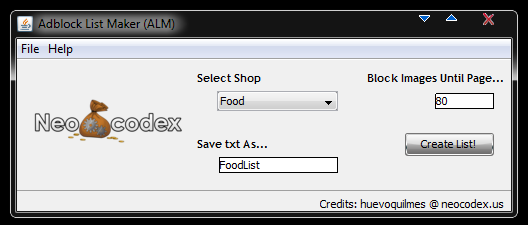
Just select the same shop name you selected in Jellyneo, put the page number (80), and select the name of the output file you want. And, in a matter of seconds, you will have, in the same folder where you have the ALM, a txt file ready to be imported to AdBlock Plus, to block all those unwanted images
Go to AdBlockPlus, import filters, and select the file... easy as that.
4. An Introduction On How To Restock
First of all, before doing any actual restocking, we need to tweak some things up. First, we will start with Firefeox. We need to go to Options -> Content -> and uncheck where it says "Enable Javascript".( what this does is when you click in a shop to buy the item, the "Are you sure you want to buy this item" popup doesn´t appear, and it automatically takes you to the haggle page).
Also, we should open the Shortkeys Lite, and set some macros. I´ll show with some images how to do this...
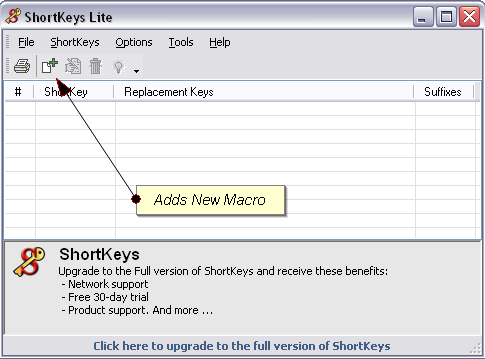
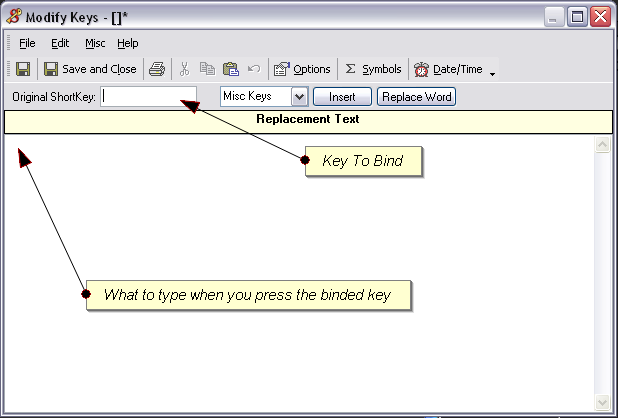
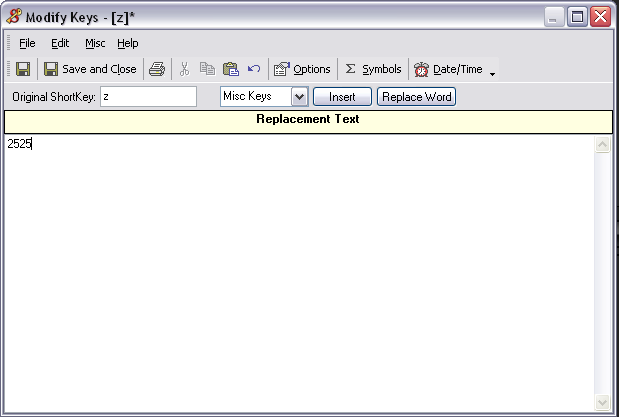
Here is an example of a usefull macro (will be explained later anyways). Everytime I press the letter "z", it types 2525.
Repeating these steps, you can set up as many macros as you can.
Ok , now to the actual restocking. First of all, you need to find a shop where you want to rs at. Just to start you guys out, I´ll just mention some of them
Beginners:
Pharmacy(#13)
Books (#7)
Chocolate (#14)
Space Weaponry(#23)
Intermediate:
Clothes(#4)
Spooky Food(#30)
Food(#1)
Expert:
Magic(#2)
Stamp(#58)
Battle Magic(#9)
Defence Magic(#10)
And also, here is a list of rarities that the accounts can see:
10 Days - R84 & Under
16 Days - R89 & Under
1 Month - R94 & Under
3 Months - R99 & Under
+4 Months - All Rarities
Anyways, like I said before, it´s up to you to look for a place where you feel confortable to rs. Don´t want to start rsing your first day at the stamp shop because you won´t be getting much profit.
Take it slow, first learn all the rsing basic, then move on to better and more profitable shops.
Lets make a pause here to explain shortkeys in more detail. You may ask yourself, why did this guy make me install Shortkeys for? Well, it can come in handy for the haggles.
For example, in a lot of shops, most of the profitable items stock with a price of 2500Nps, 5000Nps or 10000Nps.
So,my advise is, take 3 letters that are together in the keyboard (I use z, x , c) and do this in the Shortkeys program:
z -> 2525
x -> 5454
c -> 10101
So, if you ever go for an item with any of those prices, all you have to do is press 1 key instead of 4-5
The rest is pretty much straight-foward. Go to the shop, set up the ReloadEvery, and when you see an image, it means its profitable, so click away
5. Restocking Tips
- Don´t be refreshing every 2 seconds for more than 5mins. Take pauses, or you will get rs banned
- Between every couple of refreshes, do a manaul refresh yourself (so that you don´t refresh exactly every 2sec for long periods of time, to make it look like a human being is refresing instead of a program)
- Take screenies. Very important to make it look very legit!( you can disable addblock to be able to see the shopkeeper and everything in the screenie)
- Spruce up you account...don´t be rsing potions worth 5mil Nps in an account that doesn´t even have a Cheat! trophy.
- And most important of all, have fun at it....

I Would really appreciate any feedback, comments, suggestions....anything at all, to make this a better guide for everyone. I want you all to know that everything here is mine (images, words, ideas) and where not copied from anyone/anywhere...only hard work to bring these guide to you guys...so please comment away
#1453085 The Wheel of Extravagance
Posted by
on 13 May 2011 - 02:26 PM
to gamble or not to gamblee....
#1449380 Paying 100k-200k to sign up to a website :)
Posted by
on 06 May 2011 - 01:45 PM
send me the link please?
sorry just saw that it was for canada/us/uk... not from there...sorry
sorry just saw that it was for canada/us/uk... not from there...sorry
#1448164 Half Price Day
Posted by
on 03 May 2011 - 05:08 PM
geez so much crap for making a post....
and its funny, a month ago both of you taking about something really important.. o wait, its the same topic..
http://www.neocodex....29#entry1401829
and its funny, a month ago both of you taking about something really important.. o wait, its the same topic..
http://www.neocodex....29#entry1401829

