Quantcast

What works and what is paused · Email is limited to account activation and password resets.

Jump to content


esotericaKoalan

Member Since 17 Feb 2011
Offline Private

#1617711 Ivysaur's Graphic's Help Thread

Posted by esotericaKoalan on 16 August 2012 - 07:50 PM

Ah fail, I can't see today.

You should design dildos.

Oh god, that horn on lucario's head. Now I can't unsee. :(

--------------------------- (Post separator 9000!) ---------------------------

Here's a ninetails:
Posted Image

Btw, I don't have a tablet either. Pen-tool ftw!
(I do admit that it would take significantly less time if I had a tablet though...)



#1586584 Neopets Smudge Tag

Posted by esotericaKoalan on 18 May 2012 - 11:09 AM

Posted Image

http://www.mediafire...hg0el73d3em66z5


#1580085 Golden Hair

Posted by esotericaKoalan on 03 May 2012 - 11:17 AM

Preview:
Posted Image

Download: Golden Hair.psd


#1578582 SOTW #35

Posted by esotericaKoalan on 28 April 2012 - 01:35 PM

Love (or any other virtue that a heart can represent):
Posted Image

Click image for PSD.

Too bad I posted it on deviantART already.


#1577510 Pen Tool Tutorial

Posted by esotericaKoalan on 24 April 2012 - 03:32 PM

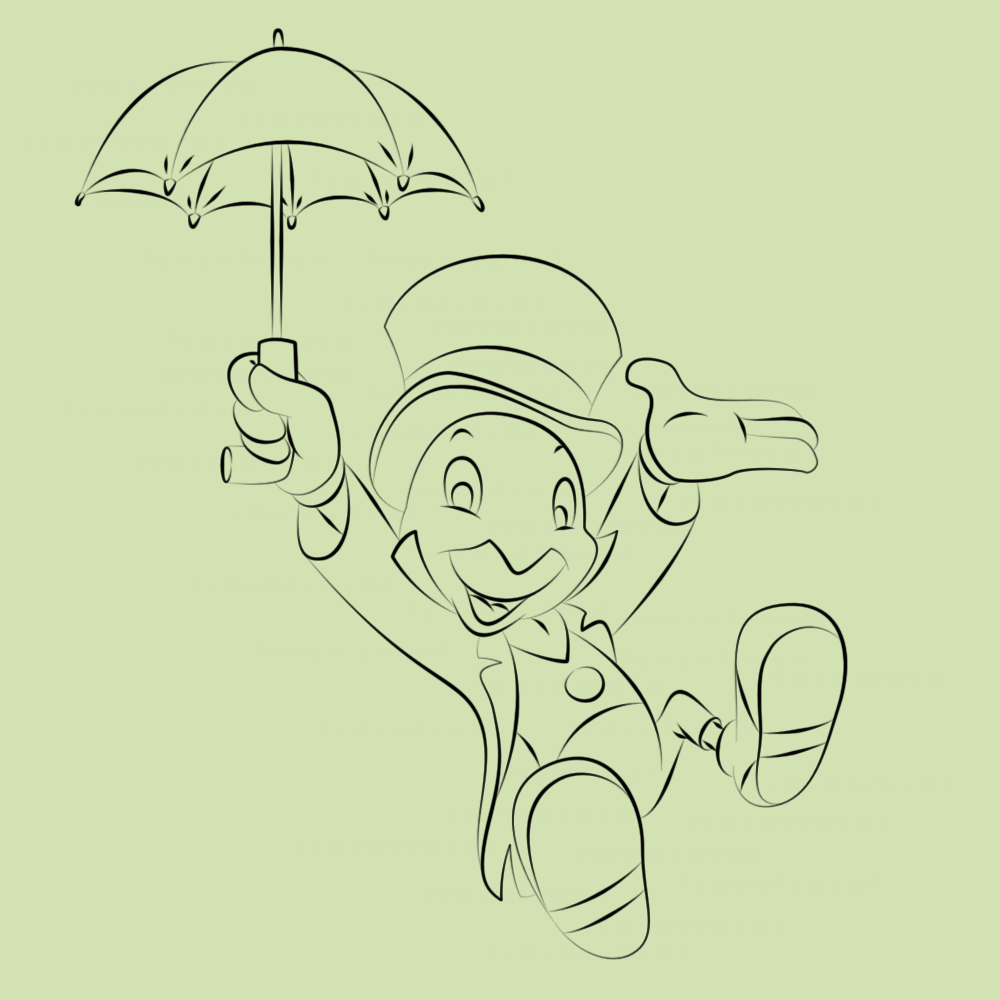
Here's a tutorial on how to use the pen tool that I wrote a while ago (and kind of forgot about when Megaupload got shut down).

It's not a very word-heavy tutorial. Instead, it shows you how I click and drag while using the pen tool.

Here's the finished product:
Posted Image

It does NOT walk you through the entire lineart - only the first few parts (hat, face, etc).
But by the time you get to the later portions, I assume that you can figure it out (if not, you can turn off the guide and retry the first few portions).

Download

If you have any questions, feel free to PM me.


#1568762 How to Make an Abrosia List - Improved (Using Notepad++)

Posted by esotericaKoalan on 31 March 2012 - 03:39 PM

In the previous guide, the list in Notepad++ was sorted alphabetically. I found that slightly annoying so I figured out a way to keep the list in order by profit.
(And I guess this will actually be useful, now that free advanced membership was removed.)

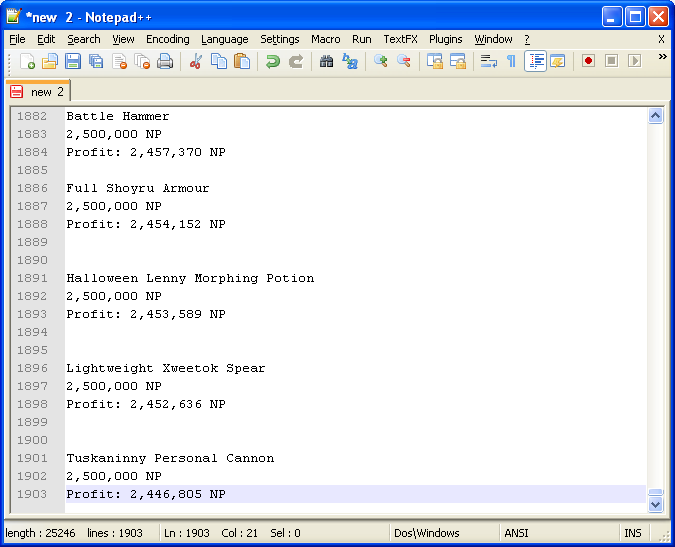
Copying the list into Notepad++ is the same. If you don't know how, read the previous guide until this picture:
Spoiler


First, we'll remove all the lines containing the string " NP".
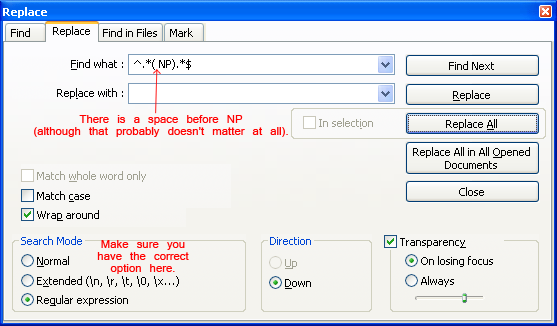
Press Ctrl+H to open the Find/Replace window.
Type ^.*( NP).*$ in the find box and nothing in the replace box.
Posted Image
Make sure you have the correct options selected!

Here's a crude explanation of what the symbols mean (skip if you're not interested):
Spoiler

After you're finished, click the "Replace All" button, and all the lines that had " NP" should be gone now!

Now we will remove the blank lines. But first, we have to remove some of the tabs on a few lines. Press Ctrl+H again to open the Find/Replace window (or just don't close the Find/Replace window).
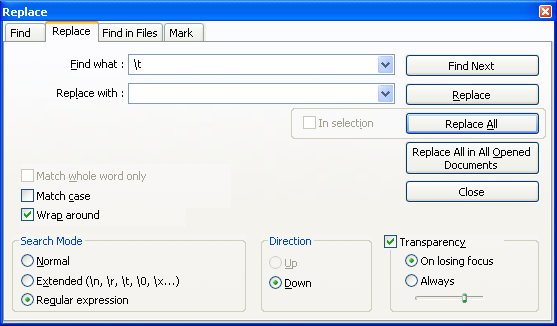
Type \t in the find box and nothing in the replace box.
Posted Image
Nothing visible should change, but all the tabs are gone now.

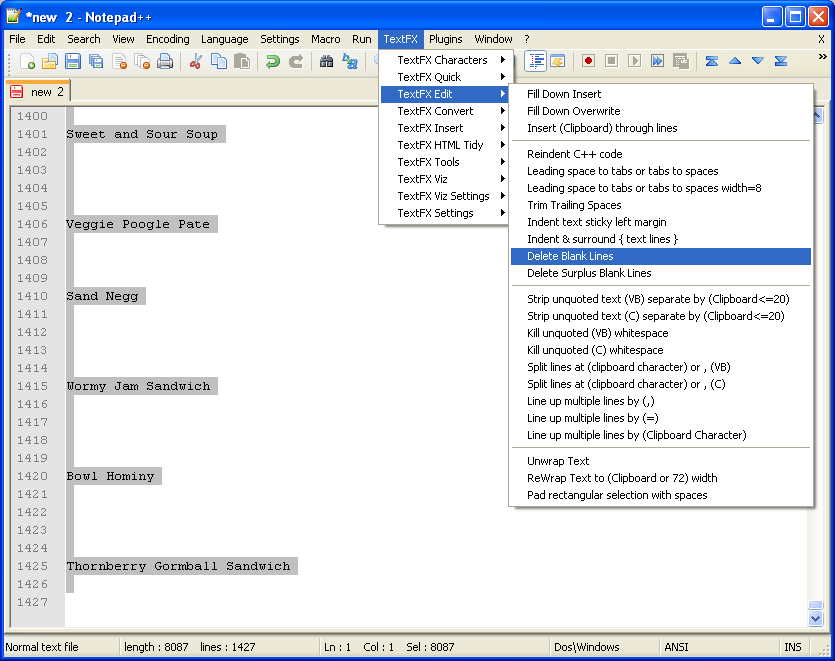
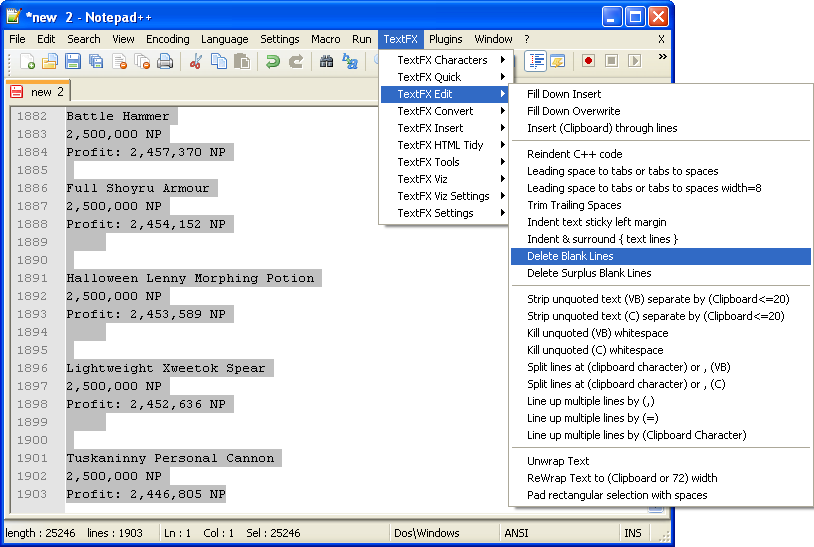
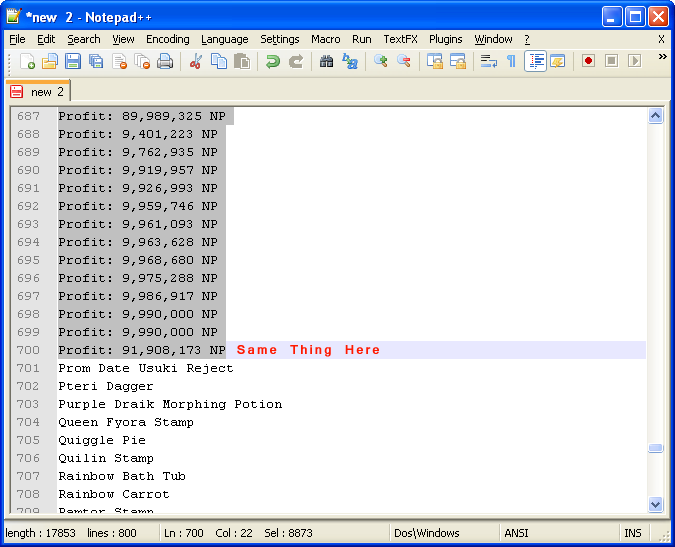
Finally, press Ctrl+A to select everything, go into TextFX, and delete all the blank lines.
Posted Image

There you go! Now you have your Abrosia list in descending profit.
(There might still be a blank line at the beginning and the end. Just delete those using backspace or something.)

Edit: I removed a bunch of redundancies...


#1568568 SOTW #32 Voting!

Posted by esotericaKoalan on 30 March 2012 - 07:19 PM

Although it's super low quality, the 3d-effect in 2 is pretty amazing.
(Animated gifs are still overrated though. The movement itself isn't that interesting, just the depth.)


Also, in my opinion, diffusion dither is better than pattern dither, the individual pixels are less noticeable.
(But then again, pattern dither does add a more "8-bit" style to it...)


#1551373 First sig in probably a year

Posted by esotericaKoalan on 31 January 2012 - 02:56 PM

Ok, I won't be gentle then. But I'll still put it in a spoiler.
Spoiler


#1545468 SOTW #27

Posted by esotericaKoalan on 12 January 2012 - 12:32 PM

Starts: NOW

Entries Due: Friday January 20, 2012

Voting Ends: Sunday January 22, 2012

Theme: Color Splash


A color splash is a grayscale image with a splash of color!
Here are some examples:
Posted Image
Posted Image
Posted Image

Oh, I forgot, also include the original stock that you used, so I can see if you actually did anything or not.

And here is an example of an actual signature:
Posted Image


Please read the Rules before sending in your entry.


Complete list of rules found HERE and we encourage the reading of the full rules so as not to be caught out doing something wrong.


Prizes:


Mystery Morphing Potion (will be revealed to winner of 1st prize only) - Donated by Strategist
Pirate Meerca MP - Donated by Rainie
Baby PB - Donated by Rainie
PM me or Strategist if you wish to donate.


#1541001 SOTW #25 Results!

Posted by esotericaKoalan on 27 December 2011 - 11:07 AM

It's kind-of a downside that if you enter a SOTW, you can't CnC until after it's finished, or you'll be disqualified for giving away which tag is yours.
(I mean, I want to post my opinions, but I can't until it's over...)

Again, these are just my opinions, from seeing tons of tags in the past, and you don't have to agree with them.
Spoiler


#1538638 SOTW #25

Posted by esotericaKoalan on 19 December 2011 - 06:08 PM

This sounds good! I'll probably enter.
What is meant by the music theme? Isit music in general or like your favourite band or genre?

I would think anything that has something to do with music...

E.g. music notes, music-based games/characters, headphones, instruments, etc.


(I got Ninja'd.)


#1538046 A Request...

Posted by esotericaKoalan on 17 December 2011 - 02:45 PM

Took me around 10 minutes to make. Imitating styles is my specialty. :)
(The font here is slightly different because I don't know what the font in the avatar is.)
Posted Image

Here is a link to the PSD version.


#1536411 Neocodex Advent Calendar - 2011

Posted by esotericaKoalan on 12 December 2011 - 12:51 PM

Nymh is awesome, I tell you what ♥♥♥. Easter Egg: First person to find and quote this wins a bonus prize.


:D


#1532527 How to Make an Abrosia List in Less than 5 Minutes!

Posted by esotericaKoalan on 28 November 2011 - 01:34 PM

Well, I've been on the forums for a little, and there hasn't seemed to be a guide on how to efficiently create manual shop lists. So I've decided to make one.
(There might be an easier way, but I haven't seen any on these forums.)

First, you'll need Notepad++.
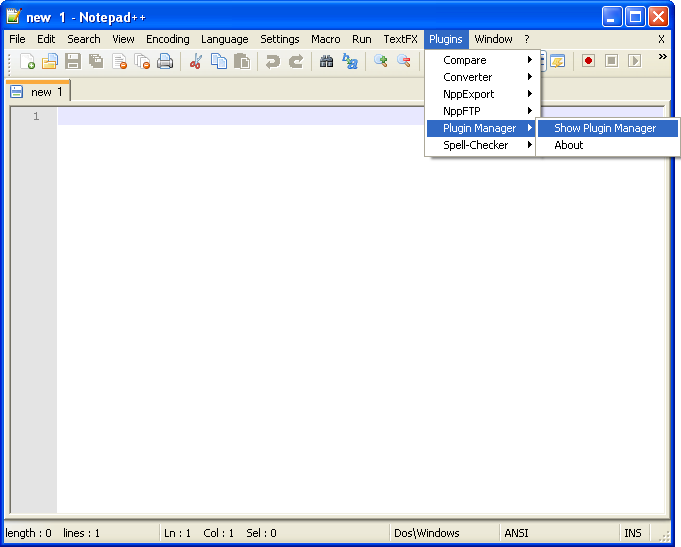
After downloading, open it up and make sure you have the TextFX plug-in.
If you don't, go into the plugins manager, and install it from the list of available plugins.
Posted Image

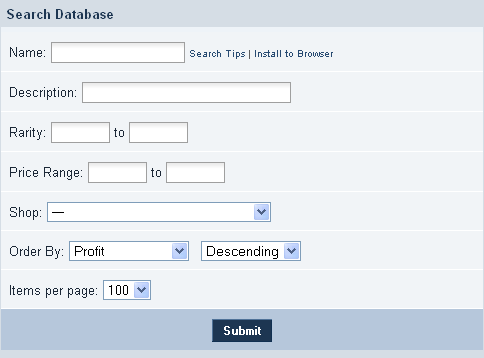
After that, search the database for a group of items that you want to buy from. This is what I searched for:
Posted Image
Yeah, not the best search for a list, but it'll do for purposes of this guide.

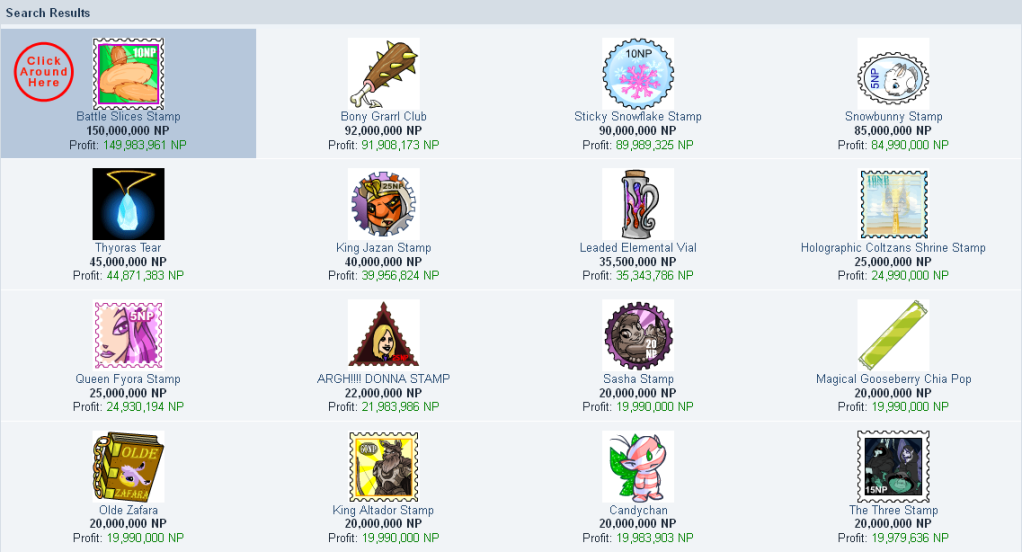
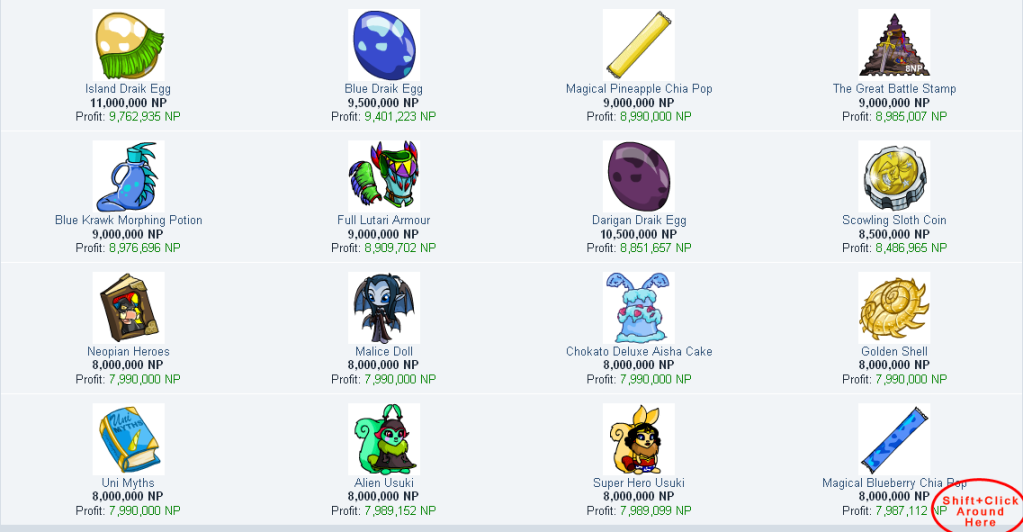
So you'll see something like this (depends on what you searched for):
Posted Image
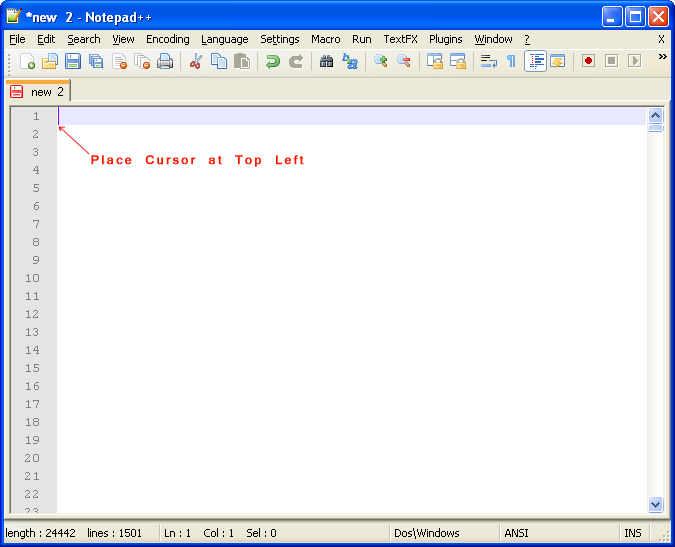
Like the image says, click somewhere around the left of the first image.

Scroll down to the bottom:
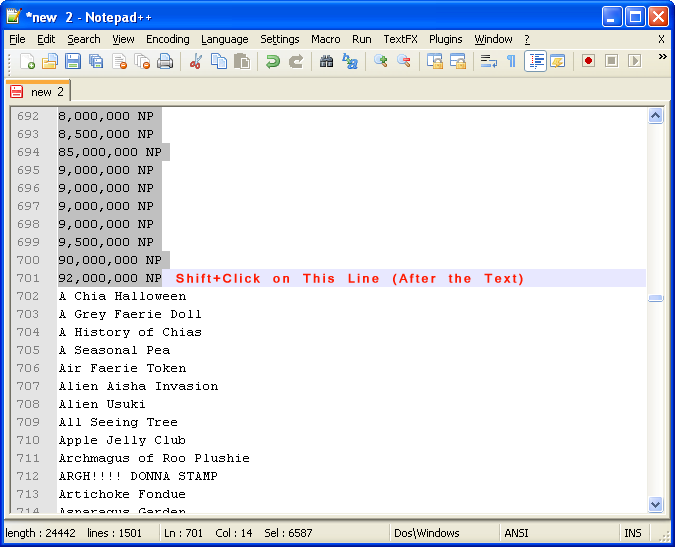
Posted Image
Shift click where indicated to select all the items on the page.

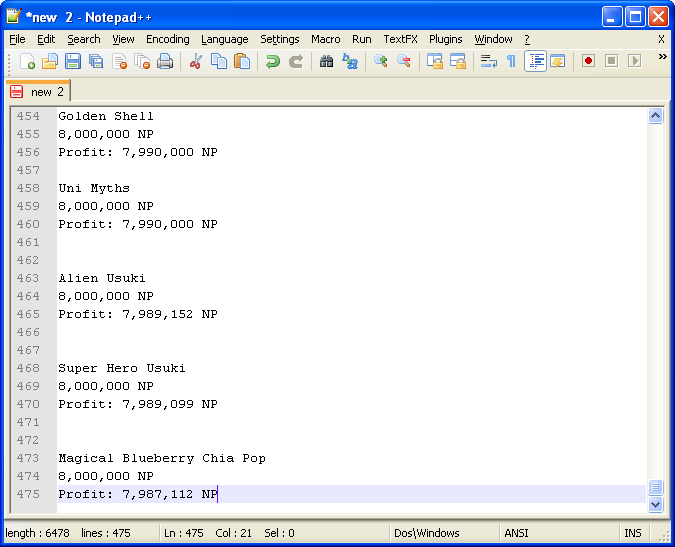
Now copy and paste it into Notepad++:
Posted Image

Repeat with how ever many pages you desire (I went up to the 4th page, 400 items total):
Posted Image

Press Ctrl+A to select everything in Notepad++:
Posted Image
Then go to the option specified in the picture to delete all the blank lines.

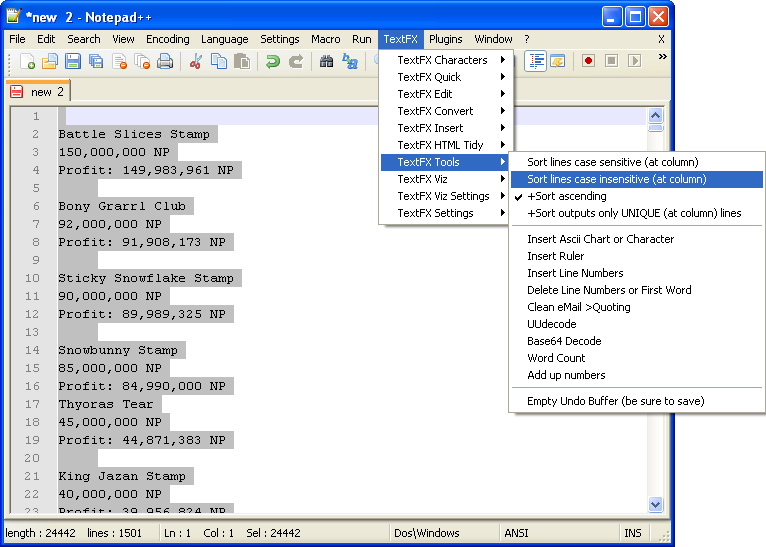
Afterwards go to this option (Make sure you don't deselect everything; if you do, just press Ctrl+A again):
Posted Image
This sorts all the lines alphabetically, spaces before numbers, numbers before letters.

Time to delete the useless stuff! The pictures are pretty self explanatory.
Posted Image
Posted Image
Be careful if you have items with numbers as the first character (some items like books do).
They're usually pretty noticeable, but you wouldn't want to delete them.

And do the same with the profit:
Posted Image

All done!

Of course, this guide is useless for advanced members.


#1531782 SOTW #22 Voting!

Posted by esotericaKoalan on 25 November 2011 - 05:41 PM

It's discouraging to new people who want to enter the sotw, when we should be doing the opposite.


Those were just some thoughts I had as I was viewing each one. They're not criticism, they're not supposed to be constructive - they're just what impression each tag made on me when I glanced at them for 10 seconds each.
And they were in a spoiler so you didn't have to read them.

I can go in-depth for each one, so I am going to do so now (because I have some free time on my hands):
Spoiler

Of course, you can disagree with me, these are just my opinions. And I'm not always right either.


Well, that took a while... Abrosia bought 2 stamps (and missed like 20) while I was typing.